The work behind every great swim.
Swim team management software for the whole coaching staff.
The season plan. Tomorrow’s practice. Saturday’s lineup. Bring your coaching staff’s work together, then take it to the pool.
$15 a month per coaching seatBy swim coaches, for swim coachesKeeps working when the pool Wi-Fi drops

The problem
A season lives in too many places.
Practices in a notebook, the roster in a spreadsheet, entries in another program, results in somebody’s inbox. And the pool deck has the worst Wi-Fi in the building.
Practices nobody can add up
Sets written in a notebook can’t tell you the yardage, the zone mix, or what the group swam last week.
A staff out of step
Two head coaches, three assistants, and nobody sure which copy is the real one.
Meet operations are confusing
A complicated run screen that no volunteer wants to learn.
Dead spots on deck
The practice is on the office laptop, and the Wi-Fi stops at the bleachers.
How it works
Written at your desk. Ready at the pool.
You’ve done the planning. Now you can watch the swimmers. Every practice, roll and result belongs to the same team, so the next decision has the whole season behind it.
-
Before the first whistle
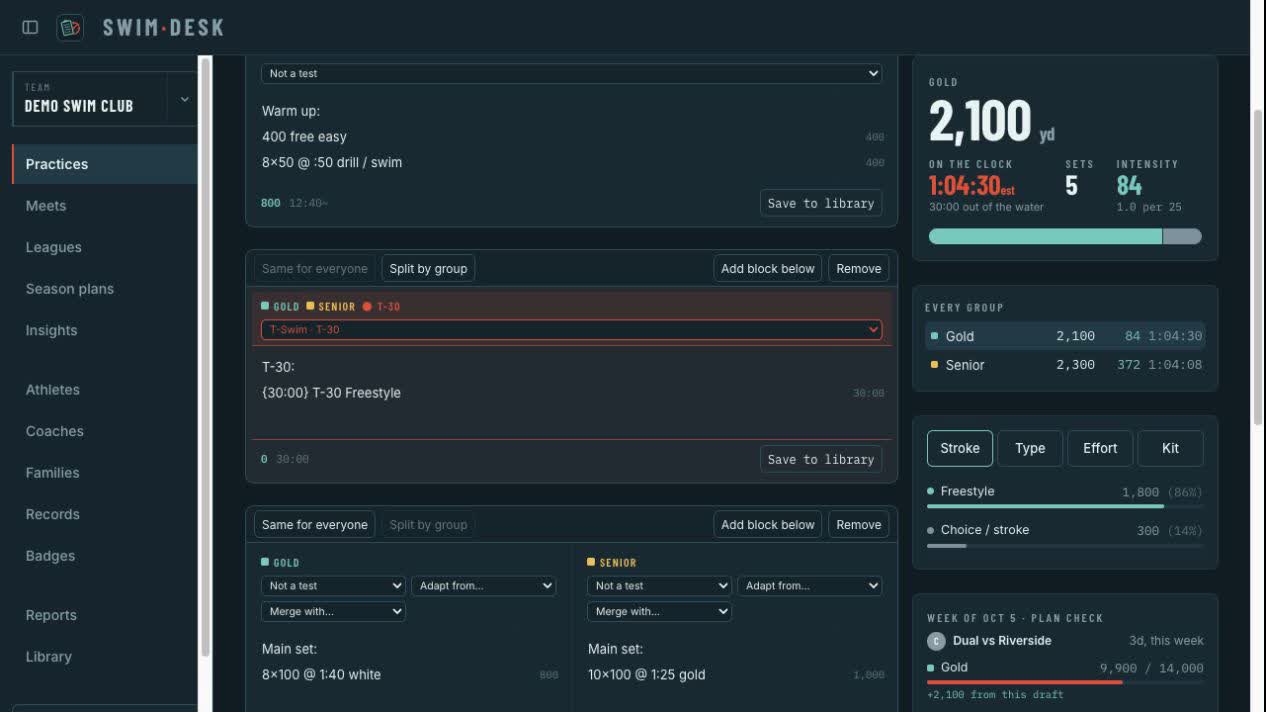
Plan the season by group, phase and week. Write sets in the shorthand you already use, and the yardage and zone mix add up as you type.
-
At the edge of the pool
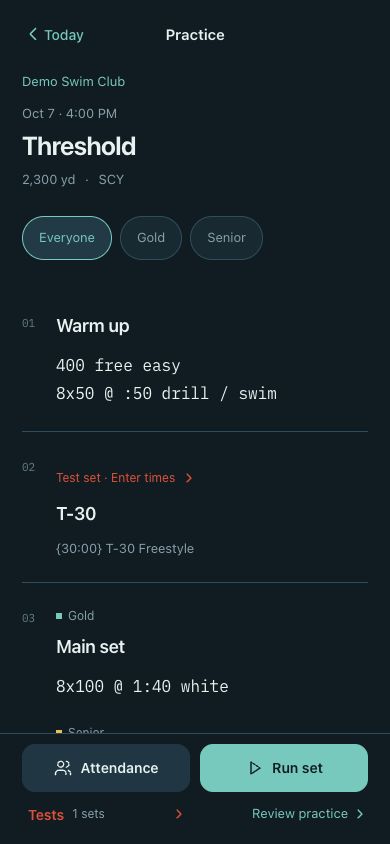
Open the day’s practice on your phone. Mark who’s here, record test times and run the clock. Loaded work keeps going offline and syncs when you reconnect.
-
When it’s time to race
Build the lineup and the relays, send the host the entry file they expect or host the meet through SwimDesk, and bring the results back into the ecosystem.
From opening week to championships
One team. The whole season.
Practices, entries and results belong to the same team. Give your staff a shared place to work and a season’s worth of context for the next decision.
Season plans & practices
Plan by group, write in swim shorthand, and build your coaching library.
Coaching on the deck
Today’s practice, attendance, test times, and a clock on your phone.
Meet entries & operations
Enter another team’s meet or run your own: seed the heats, take times from the console, and score it as it happens.
Results, records & reports
Follow improvement, celebrate achievements, and show the season’s work.
Your team & families
Rosters, coach access, and a place for families to stay involved.
Bring your existing work
Import supported rosters, results, and practices. Export entries for the host.
SwimDesk Live
A place for the people cheering them on.
Families follow published results and team news on SwimDesk Live. Your team’s Families area brings together coach updates, meet RSVPs, volunteer jobs and shared files, and families never see the coaching desk.
Age group club
Northside Aquatics
The coaching desk for any age-group club
Or start with your program
For age-group clubs
The full RSVP ecosystem
Ask families which sessions they can make, staff the meet with volunteers, and share updates and files, all tied to the entries you build.
See SwimDesk for age-group clubs- Meets & RSVPFamilies answer swimmer by swimmer on SwimDesk Live.
- Volunteer jobs & hoursSpots that can’t be double-booked, and one hours total per family.
- Feed & filesPosts and papers that reach only the families they’re for.
One account
Three places to work. One copy of the season.
The account holds the work. Each device keeps a working copy, so typing, roll and the clock never wait on pool Wi-Fi.
You are here
The desk
www.swimdesk.us
Plan the season, write practices, prepare entries and print reports, on a laptop or a large iPad.
On the deck
Poolside
iPhone · iPad mini · Android
Today’s practices, roll, test times and the pace clock, at the edge of the pool.
For families
SwimDesk Live
live.swimdesk.us
Published results, team pages and the Families area, for parents and swimmers.
Pricing
Your next season starts here.
A shared coaching desk and a companion for the pool. Choose monthly or annual billing for each coaching seat.
“Send us a sample of your rosters, results or practices, and we’ll show you how they come across before you move your program.”
Clubs, schools, and universities: contact us about multi-year contracts and volume discounts.
$15per seat / month
Pay annually and save $30 per seat.
Every coaching seat
- The coaching desk, on the web and on large iPads
- Poolside on iPhone, iPad mini and Android
- Your team’s page on SwimDesk Live
Can our coaching staff share a team?
Yes. Invite coaches to the team and give each person their own email-and-password sign-in. Access follows their responsibilities. Coaching access needs a subscription; billing, staff administration, and public team-page access do not.
What happens when the pool Wi-Fi drops?
Open your practice before heading to the deck. The loaded board, attendance, test entry, and clock keep working on your device. Changes sync to your account when you reconnect.
Can we bring our existing records?
SwimDesk imports supported HY-TEK rosters and results, Workout Manager practices, and Commit Swimming PDF practice exports. It also exports HY3 meet entries. Send us a sample of your files if you want to check the fit before moving your program.
Will it work with our timing equipment?
Meet operations takes typed times, and the desk reads a Colorado Time Systems System 6 straight from its computer port, in Chrome or Edge on a laptop, with no internet needed. Try it on your own console before a meet, and tell us your model so we can check it with you.
What do families see?
SwimDesk Live shows published meets, results, and team pages. A team’s Families area supports coach updates, session RSVPs, volunteer jobs, and shared files. Families do not get access to the coaching workspace.